![Slideform_logo_master-1.png]](https://helpcenter.slideform.co/hs-fs/hubfs/Slideform_logo_master-1.png?width=50&height=50&name=Slideform_logo_master-1.png)
Navigate to Settings on the main menu to manage your personal Slideform account.
Account Settings-
Change your password
Manage your display name and password
Join a user team
Assign yourself to a Team
Authorize your Google workspace
Connect your Google account to pull in data and templates from your Google Drive.
Connect your Microsoft OneDrive
Authorize with Microsoft to pull in data and templates from your OneDrive.
Set an Upload Directory for all output
Select a folder or directory where ALL output created by your account will be stored.
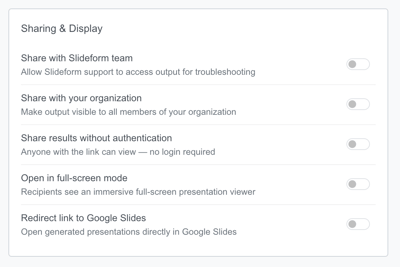
Manage Output sharing settings
Choose from optional settings that will apply to all output presentations created by your account.
API Keys-
Connect an API Key to use your own account with an AI model provider. See Connect your own API Key